
FarmBooks: Photograph a Bill, Get Schedule-F-Ready Books
The line amounts have to equal the bill's printed total within two cents before anything is allowed to post, and every bill stays a draft until a person submits it.
A spreadsheet cannot check its own arithmetic.
Farm bookkeeping runs on paper that does not cooperate: co-op tickets, dealer parts invoices, chemical and seed bills, fuel statements, each with its own layout, and each one needing to be split across fields, entities, and IRS Schedule F categories before it means anything at tax time. The default tool is a spreadsheet and a bookkeeper retyping every line by hand.
The failure modes are not exotic. They are the ordinary ones of any spreadsheet kept by a busy person: a hand-typed SUM that does not reach far enough, a paste block that lands twice, one delivery billed once and counted on two sheets. When we imported a live three-farm operation's existing hand-kept workbook, all three were sitting in it, and they are still true of that source file today. Nothing in the spreadsheet was ever going to find them.
Deterministic checks around every number, and a person at every uncertain moment.
A bill arrives however it actually arrives: emailed as a PDF, mailed as a statement, or photographed in the cab, sideways and badly lit. Photographs are straightened before they are read, and a multi-page bill is put back together by proving the math: a continuation page is matched to its parent by checking the page's line total against the printed subtotal, so the same arithmetic that proves the pages belong together proves they are in the right order. Vendor identification works cheapest-signal-first, and a layout it has never seen falls back to a generic profile and a human look rather than a guess.
Then the arithmetic conscience the spreadsheet never had. The line amounts must equal the printed total within two cents or the bill is held for a person. If a line disappears between processing stages, the system raises an error instead of posting a quietly smaller bill. Non-billable footer rows are stripped with a running count, so an audit can prove nothing real was discarded. A re-sent bill is caught on identity (same vendor and total inside a short window, or a matching vendor document number), not on file bytes.
Understanding what was bought is a translation problem, and we treated it as one. A 530-entry dictionary turns co-op shorthand into plain English and keeps the exact printed text beside it, always reachable, because a prettier description must never be able to move a dollar figure. Categorization resolves in order: the farm's own confirmed corrections first, then that deterministic dictionary weighted by vendor context, then a single batched model call for anything still unresolved, locked to a 26-category taxonomy and never free-form. The Schedule F line is always re-derived from the category and never accepted from the model. Across 893 ledger lines from 101 bills in one crop year at a live three-farm operation, zero came out uncategorized.
Nothing posts itself when anything is uncertain, and uncertainty here is boolean rather than a percentage: certain, or it needs a person's eyes. A self-reported confidence score was deliberately removed, because a made-up score is not something a set of books should lean on. A handwritten quantity is always routed to review no matter how clean the read looks. An overlay that highlighted the exact spot on the image was built and then turned off after it once drew the box around the wrong product line, on the judgment that a confident pointer that is wrong is worse than no pointer. Every bill lands as a draft, and the money moves when a person presses submit.
What makes the result defensible is the record. Every field is stored as a printed-value and translated-value pair, so from any amount in the app you open the original bill it came from and read the exact words the vendor printed. Every change (assigning a field, changing a category, splitting, cost-sharing, confirming, submitting): writes an audit row carrying who, when, the previous value and the new value, inside the same transaction as the change itself. The history cannot drift from the data, because the system refuses to record one without the other.
Watch it work on demonstration data.
Watch it read a bill, then close the books.
Demonstration dataOne photograph in the field, one crop year out.
This stage shows FarmBooks reading a photographed farm bill, filing its lines into categories, checking its own arithmetic, catching three common billing mistakes, and closing a crop year into a workbook you can export. The farm, the vendors, the fields and every amount shown are a demonstration, invented for this page.
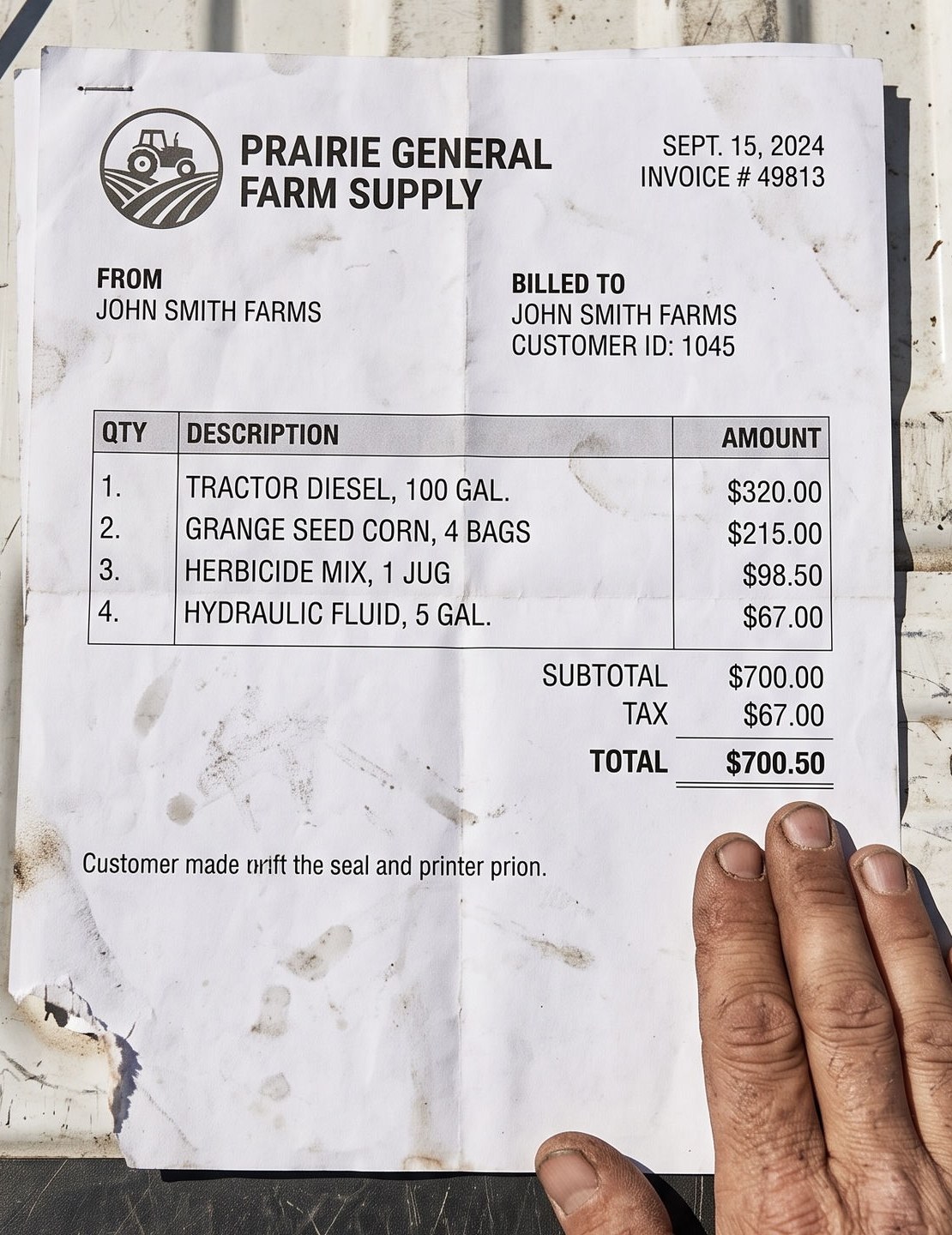
One bill, straight off the tailgate.
Your whole June, added up.
Three ways a bill costs you more than it should.
The co-op billed you wrong.
Add up the co-op’s own line items and you do not get the total printed at the bottom of their bill. The total is the number you would have paid.
What the paper says
What FarmBooks did
The line amounts are added up and checked against the total printed on the bill, down to two cents. When the two disagree, the bill is held.
Where it ends
The bill stops here and waits for you, so you find $410.00 before you pay it.
You were billed for ground you farm on shares.
The application is billed to you whole, because you are the one who ordered it. Two-thirds of that ground is not yours to pay for, and on the bill it looks exactly like your expense.
What the paper says
What FarmBooks did
The expense is cut to the share you actually farm. The rest is recorded as money the landowner owes back to you.
- Your third, the only part that is your expense
- $4,000.00
- The landowner’s two-thirds, owed back to you
- $8,000.00
Where it ends
In the books$8,000.00 comes off your expenses and onto what the landowner owes you.
The same load, billed twice.
You send the ticket in the day the load comes. At the end of the month the co-op’s statement bills you for that same load again.
What the paper says
Delivery ticket
Co-op monthly statement
What FarmBooks did
The second copy is matched to the load already in your books, and stops there.
Already in the books: the statement line never posts.
Where it ends
That load costs you $8,412.00, not $16,824.00.
Matched on the vendor, the amount and the date: same vendor, same amount, inside forty-five days.
The whole year, three ways, on one screen.
How a bill becomes a ledger line that holds up.
Add a bill by photograph or email; sideways, crumpled, and multi-page bills are handled as they arrive
Continuation pages are matched to their parent bill by checking the page total against the printed subtotal
Line amounts must equal the printed total within two cents, or the bill is held for a person
A line that vanishes between processing stages raises an error instead of posting a smaller bill
Non-billable footer rows are stripped with a running count, so nothing real is discarded silently
A 530-entry dictionary translates vendor shorthand and keeps the exact printed text beside it
Categories resolve from the farm's own confirmed corrections, then the dictionary, then one batched model call locked to 26 categories
The Schedule F line is always re-derived from the category, never accepted from the model
Handwritten quantities always route to a person and are never auto-posted
Every bill lands as a draft; the money moves when a person presses submit
Splitting a line across fields is acreage-weighted and cent-exact, and stops rather than invent a ratio for a field with no acreage on file
Corrections become durable, farm-specific mappings applied to every later bill from that vendor
Guardrails
- Arithmetic validation on every bill, within two cents of the printed total
- Cross-stage line check, so no bill can post quietly smaller than it was
- Confidence is boolean by design: certain, or it needs a person's eyes; no percentage score
- A highlight-the-spot overlay was built and deliberately turned off after it once boxed the wrong line
- Split shares are proven three times: at allocation, before the write, and by re-reading after it
- 3,345 automated tests on the extraction engine, 2,081 on the web app
The record and the workbook
- Every field kept as a printed-value and translated-value pair
- From any amount in the app, open the original bill image it came from
- The audit row is written inside the same transaction as the change, so history cannot drift from data
- Who changed what, when, and both the previous and the new value, on every bill
- One-click .xlsx workbook: a month summary plus a ledger per farm, grouped by field
- Rollups are live Excel formulas rather than pasted values, so the file stays correct when a figure is edited
- Category names map one-to-one onto Schedule F lines
Outcomes the engagement actually produced.
The line amounts must equal the printed total within two cents, or the bill waits for a person instead of posting.
Across 101 bills in one crop year at a live three-farm operation, every ledger line resolved to a tax category.
Each operation carries its own fields and its own learned corrections, so a correction on one farm does not bleed into another.
The guardrails are pinned by tests, including one named for the rule that unmarking a lease never re-books money already posted.
Related case studies
HG Oil Holdings: AI Invoice Processing
75% reduction in manual invoice handling
HG Oil Holdings: Inventory System
95% logistics-time reduction, loss center to profit center
An MGU within the Alliant Insurance Ecosystem
Dual-model AI submission processing, zero missed renewals
Buried in farm bills at tax time?
Preisser Solutions builds document systems that check their own arithmetic before anything posts. Scoping begins with a conversation about your bills and your books.